Found this very good article on WP7 and Spring Integration... Down it goes.....
What happens when the industry leading Portal and the world's greatest application framework combine? Only good things!In this introductory article, I'll guide you through setting up the Spring 3.0 Portlet MVC Framework to work with JSR 286 Portlets running on WebSphere Portal 7. In particular, I'll show you how to:
I would recommend the second option if you're planning to use Spring throughout your enterprise solution. You're better off learning how to locate and include the requisite libraries.
[Author's Note: If you selected the first option, skip the 'How do I obtain and configure the Spring and Requisite libraries for WebSphere Portal?' section, otherwise, continue.]
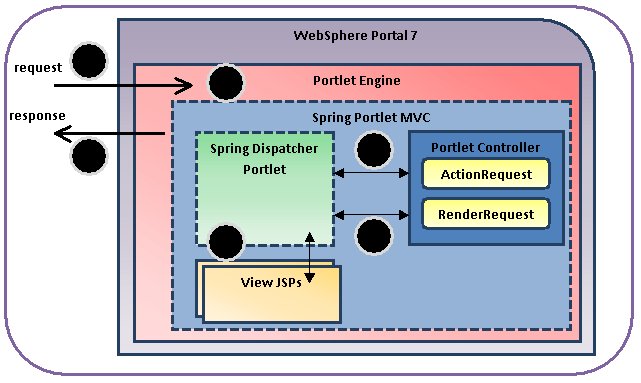
1) The client invokes the page request
2) WebSphere Portlet Engine invokes the Dispatcher Portlet
3) The Dispatcher Portlet dispatches requests to the ActionRequest and RenderRequest handlers
4) The RenderRequest handler returns the Model and View
5) The Dispatcher Portlet resolves the and renders the view
6) WebSphere Portal aggregates the Portlet content and returns the response to the client
[Author's Note: I made sure to include the source code in the WARs provided. The examples were built using Eclipse, rather than Rational Application Developer.]
What happens when the industry leading Portal and the world's greatest application framework combine? Only good things!In this introductory article, I'll guide you through setting up the Spring 3.0 Portlet MVC Framework to work with JSR 286 Portlets running on WebSphere Portal 7. In particular, I'll show you how to:
- Download all the Spring and required libraries
- Deploy the example to WebSphere Portal 7
- Describe all the moving pieces and their purpose
Where do we begin?
The best way to begin is with a working example. If offer the following options:- SpringMVCPortlet2Project-selfcontained.war [LINK] Approximately 3MB - Contains the example code and all the requisite Spring and dependent JAR libraries
- SpringMVCPortlet2Project .war [LINK] Approximately 6 KB - Contains the example code only
I would recommend the second option if you're planning to use Spring throughout your enterprise solution. You're better off learning how to locate and include the requisite libraries.
[Author's Note: If you selected the first option, skip the 'How do I obtain and configure the Spring and Requisite libraries for WebSphere Portal?' section, otherwise, continue.]
How do I obtain and configure the Spring and required libraries for WebSphere Portal?
The majority of Spring MVC examples online have developers load all the requisite Spring and Dependent Java libraries into the Web Project. I'm not a fan of this option. Instead I've decided to install the libraries to the shared Portal library.Spring Libraries
- Download the Spring 3 libraries from the following site:
http://www.springsource.com/download/community - Extract the following files from the dist folderorg.springframework.asm-3.0.5.RELEASE.jar
org.springframework.beans-3.0.5.RELEASE.jar
org.springframework.context-3.0.5.RELEASE.jar
org.springframework.core-3.0.5.RELEASE.jar
org.springframework.expression-3.0.5.RELEASE.jar
org.springframework.web.portlet-3.0.5.RELEASE.jar
org.springframework.web.servlet-3.0.5.RELEASE.jar
org.springframework.web-3.0.5.RELEASE.jar
- Copy all those JARs to the following WebSphere Portal shared directory: C:\IBM\WebSphere\PortalServer\shared\ext
Dependent Library : Commons Logging
- Download the commons-logging library from the following site:
http://commons.apache.org/logging/download_logging.cgi - Extract the commons-logging-1.1.1.jar file to the following directory:
C:\IBM\WebSphere\PortalServer\shared\ext
Depending Library : Java Standard Tag Library
- Download the jstl-1.2_1 library from the following location:
http://repo1.maven.org/maven2/org/apache/geronimo/bundles/jstl/1.2_1/ jstl-1.2_1.jar - Copy the JAR to the following directory:
C:\IBM\WebSphere\PortalServer\shared\ext
How do I install the example on WebSphere Portal 7?
The following steps describe how to install the Spring 3 Portlet MVC application. If you already know how to deploy portlets, feel free to skip this section.- Start WebSphere Portal
- Open a browser and enter the following URL:
http://<PORTAL-URL>:10039/wps/myportal
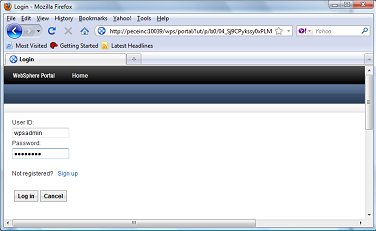
- Log in as a portal administrator v
- Click the Administration tab
- Select Portlet Management -> Web Modules
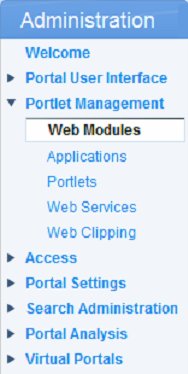
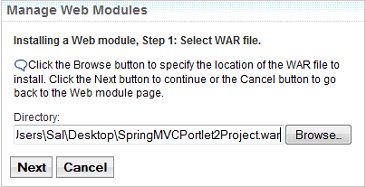
- Click the Install button
- Select the SpringMVCPortlet2Project.war file and click Next
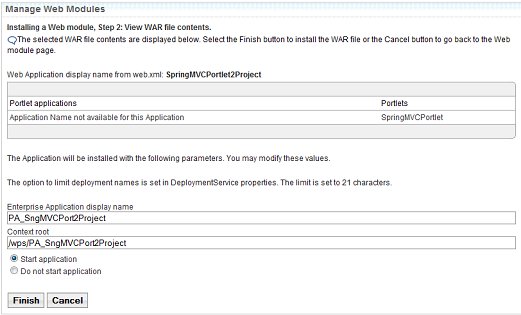
- Click Finish
- Create a new page named Success, and deploy the Spring MVC Portlet 2.0 Example to the page.
- Navigate to the page
What does the example do?
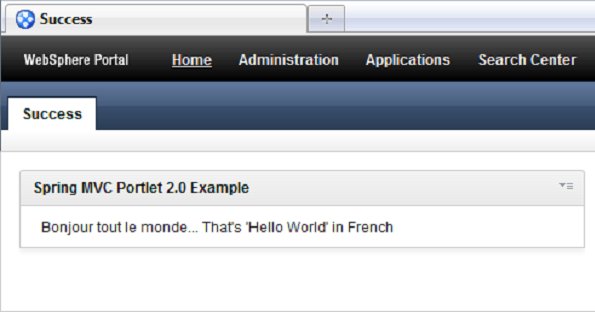
I've kept things as simple as possible, so the example doesn't do much. Once it's deployed and running, you should see a page similar to the following example:
What's happening behind the scenes?
The request lifecycle for the Portal request
1) The client invokes the page request
2) WebSphere Portlet Engine invokes the Dispatcher Portlet
3) The Dispatcher Portlet dispatches requests to the ActionRequest and RenderRequest handlers
4) The RenderRequest handler returns the Model and View
5) The Dispatcher Portlet resolves the and renders the view
6) WebSphere Portal aggregates the Portlet content and returns the response to the client
What are the components of the Spring 3.0 Portlet MVC?
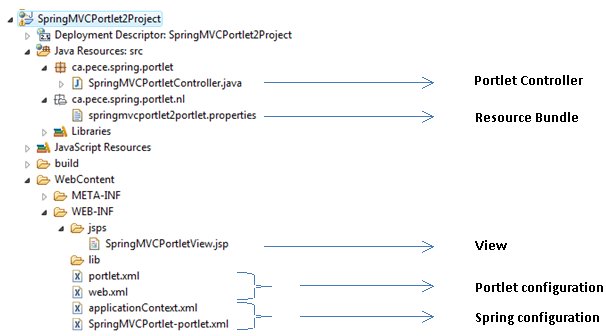
I've kept this example as simple as possible. The elements can be broken in to the following components:
[Author's Note: I made sure to include the source code in the WARs provided. The examples were built using Eclipse, rather than Rational Application Developer.]
| Portlet Controller | |
| SpringMVCPortletController.java [LINK] | The SpringMVCPortletController provides the handling logic for the ActionRequest and RenderRequest handler functionality. |
| Resource bundle | |
| springmvcportlet2portlet.properties [LINK] | Resource bundle that defines the following:
|
| View | |
| SpringMVCPortletView.jsp [LINK] | The View renders the results of the model. |
| Spring configuration | |
| SpringMVCPortlet-portlet.xml [LINK] | Defines the following:
|
| applicationContext.xml [LINK] | Defines the beans to invoke for the Spring Portlet MVC |
| Portlet Configuration | |
| web.xml [LINK] | Defines and instance of the ViewRendererServlet to allow the DispatcherPortlet to function |
| portlet.xml [LINK] | Defines the following:
|

Hi Vinaya
ReplyDeleteYour article on Spring MVC V3.0 is based on WebSphere V7.0. Appriciate the detailed steps drafted on this blog.
Well will this Spring MVC V3.0 compatible on WebSphere Portal 6.1 and 6.1.5
I'm trying to find compatible Spring and Hibernate Version Api's for Portal 6.1 / Portal 7
Besides the link http://www.ibm.com/developerworks/websphere/techjournal/0609_alcott/0609_alcott.html#support
I could only find your blog providing the location for Spring Jars to take for.
Please can confirm that this Spring Version 3.0 also compatible with Portal 6.1 and 6.1.5
-Regards
vinayak
www.simplevinay.com